



Download Gaia Online – Free Secure Virtual Community Platform
Overview of Gaia Online
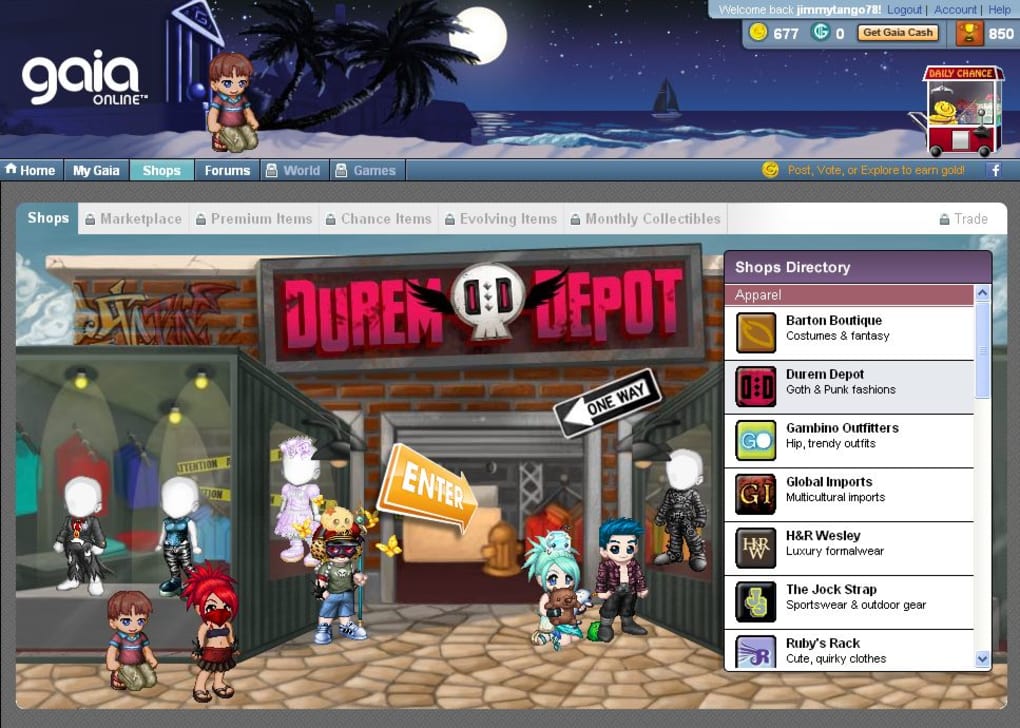
Gaia Online is a vibrant web‑based community that blends social networking, role‑playing, and casual gaming into a single, immersive experience. Originating as an anime‑focused forum, Gaia has evolved into a full‑fledged virtual world where users create personalized avatars, decorate homes, drive customized vehicles, and interact with millions of fellow members in real time. The platform’s design borrows the best elements from Facebook’s social feed, MySpace’s customization freedom, Second Life’s 3‑D navigation, and FarmVille’s casual economy, delivering a unique hybrid that appeals especially to teenagers and young adults with a passion for manga, anime, and internet culture.
Daily activity on Gaia is astonishing – more than one million forum posts are generated each day, and users can earn “Gaia Gold” through quests, mini‑games, and marketplace transactions. Whether you’re looking to chat, showcase your fashion sense, or explore a virtual city while watching YouTube videos with friends, Gaia Online offers a secure, free‑to‑play environment that encourages creativity, social connection, and lighthearted competition. The onboarding process is simple: sign up, customize your avatar, complete a few introductory challenges, and you become a Gaia citizen ready to explore the sprawling virtual neighborhoods, shop for exclusive items, and join community events that run around the clock.
Key Features That Make Gaia Online Stand Out
- Avatar Customization: Hundreds of clothing items, accessories, and hairstyles let you design a truly unique digital persona.
- Virtual Real Estate: Purchase, furnish, and decorate houses, apartments, or even a personal “crib” with furniture and décor earned or bought with Gaia Gold.
- Vehicle Pimping: Own a virtual car, bike, or scooter and upgrade its appearance with paint jobs, rims, and custom parts.
- Gaia Gold Economy: Earn in‑game currency by completing quests, participating in events, or trading items on the marketplace; optionally buy Gold with real money.
- Interactive World Navigation: Walk through 3‑D neighborhoods, enter cafés, watch videos in shared rooms, and chat with avatars in real time.
- Social Hub & Forums: Post status updates, join topic‑based forums, send instant messages, and follow friends across the platform.
- Regular Community Events: Seasonal festivals, art contests, and multiplayer games keep the experience fresh and engaging.
- Cross‑Platform Access: Play from any modern web browser on Windows, macOS, Android, or iOS without the need for heavy downloads.
- Safe Moderation Tools: Built‑in reporting, parental controls, and a dedicated moderation team help maintain a respectful environment.
- Integrated Mini‑Games: From puzzles to strategy battles, mini‑games provide extra ways to earn Gold and level up your avatar.
Installation & Usage Instructions
Step‑by‑Step Setup
Getting started with Gaia Online is straightforward because the platform runs entirely in a web browser. Follow these steps to begin your adventure:
- Choose a Supported Browser: Gaia works best on the latest versions of Chrome, Firefox, Edge, or Safari. Ensure JavaScript is enabled and pop‑up blockers are disabled for Gaia’s domain.
- Create an Account: Visit GaiaOnline.com and click “Sign Up.” Provide a valid email address, choose a unique username, and set a strong password. You’ll receive a verification email – click the link to activate your account.
- Complete the Avatar Wizard: After logging in, you’ll be guided through a quick avatar creation wizard. Pick a base model, select a skin tone, and choose your first outfit from the starter collection.
- Earn Your First Gaia Gold: Participate in the introductory quest chain. Tasks include posting a forum comment, adding a friend, and visiting the virtual marketplace. Completion rewards you with a modest amount of Gold.
- Navigate the World: Click the “World” tab to enter the 3‑D city. Use the arrow keys or on‑screen navigation arrows to move your avatar, and click on objects or NPCs to interact.
- Personalize Your Space: Head to “My Gaia” → “Home” to start decorating. Drag and drop furniture, adjust wall colors, and place decorative items. Changes are saved automatically.
- Stay Connected: Use the “Social Hub” for instant messaging, status updates, and forum browsing. You can also link your Gaia profile to Facebook or Discord for cross‑platform notifications.
- Upgrade & Purchase: When you’ve accumulated enough Gold, visit the “Shop” to buy premium clothing, vehicles, or decorative items. If you prefer faster progress, you can purchase Gold directly using a credit card, PayPal, or supported mobile payment methods.
Because Gaia Online is browser‑based, there is no traditional installation file to download, making the process quick, secure, and free of malware concerns. For mobile users, Gaia offers a responsive design that adapts to smaller screens, and a lightweight companion app is available on Android and iOS for push notifications and quick chat access.
Compatibility and System Requirements
Gaia Online is built on HTML5 and runs smoothly on any modern operating system with an up‑to‑date web browser. Below is a breakdown of the supported platforms:
- Windows: Windows 10 and later – Chrome, Edge, Firefox, or Safari (via Windows Subsystem for Linux) are fully supported.
- macOS: macOS 10.14 (Mojave) and newer – Safari, Chrome, or Firefox provide optimal performance.
- Linux: Any recent distribution (Ubuntu 20.04+, Fedora 33+, etc.) using Chrome or Firefox.
- Android: Android 7.0 (Nougat) and above – Access through the Chrome mobile browser or the official Gaia Android app available on Google Play.
- iOS: iOS 12 and later – Use Safari or the Gaia iOS app from the App Store.
Because Gaia is a cloud‑hosted service, there are no heavy graphics files to download, which means low RAM usage (generally under 300 MB) and modest CPU load. A stable internet connection with at least 2 Mbps download speed is recommended for smooth navigation, especially when streaming embedded YouTube videos or participating in live events. Users on slower connections may experience occasional lag in the 3‑D world but can still access forums, messaging, and inventory management without issue.
Security is a top priority; Gaia employs HTTPS encryption for all data transmission, and the platform undergoes regular security audits. For users concerned about privacy, Gaia offers optional two‑factor authentication (2FA) and allows you to control the visibility of your profile, friends list, and personal information via the “Privacy Settings” menu.
Pros & Cons, Frequently Asked Questions, and Final Verdict
Pros
- Completely free to join with optional paid enhancements.
- Deep avatar and environment customization that encourages creativity.
- Active community with millions of daily posts and regular events.
- Cross‑platform access via any modern browser; no heavy client download.
- Secure HTTPS connection and robust moderation tools.
- Integrated mini‑games and quests that reward in‑game currency.
Cons
- Steep learning curve for newcomers due to the sheer amount of features.
- Some premium items can be pricey for users who prefer not to spend real money.
- Interface feels dated compared to newer social‑gaming platforms.
- Occasional server maintenance can cause brief downtime.
- Target audience leans heavily toward teenage anime fans, which may limit broader appeal.
Frequently Asked Questions
Is Gaia Online safe for teenagers?
Yes. Gaia employs HTTPS encryption, offers two‑factor authentication, and has a dedicated moderation team that reviews reports and enforces community guidelines to keep the environment safe for younger users.
Do I need to download any software to play?
No. Gaia Online runs entirely in a web browser. You can also use the optional mobile app for Android or iOS if you prefer push notifications and quick chat access.
How can I earn Gaia Gold without spending real money?
Gold is awarded for completing quests, winning mini‑games, selling items on the marketplace, and participating in community events. Consistent daily activity can accumulate a respectable balance over time.
Can I link my Gaia account to social media?
Yes. Gaia allows you to connect your profile with Facebook, Discord, and Twitter for easy friend imports and cross‑platform notifications.
What are the system requirements for the best experience?
A modern browser (Chrome, Firefox, Edge, Safari) on Windows 10/macOS 10.14+ or mobile devices running Android 7.0/iOS 12+. A stable internet connection of at least 2 Mbps ensures smooth navigation and video playback.
Conclusion – Is Gaia Online Worth Your Time?
Gaia Online remains one of the most enduring virtual communities on the web, offering a blend of social networking, role‑playing, and casual gaming that is hard to find elsewhere. Its free‑to‑play model, deep customization options, and bustling forums make it an attractive destination for anime enthusiasts, gamers, and anyone seeking a colorful escape from the real world. While the platform can feel overwhelming at first and some premium items carry a price tag, the sheer volume of free content and regular events ensures that even casual players will find plenty to explore without spending a dime.
For users who value creativity, community interaction, and a safe environment, Gaia Online is a solid choice. The easy browser‑based access means you can dive in instantly, and the responsive design works well on both desktop and mobile. If you’re ready to meet new friends, dress up your avatar in the latest virtual fashion, and explore a world that never stops evolving, download Gaia Online today and start your journey as a citizen of the digital cosmos.



.png)



